
How to Choose the Right Office Chair for Long Working Hours
-
By Smart Modern
- Posted on
- 0 comments
How to Choose the Right Office Chair for Long Working Hours
For many professionals, spending several hours at a desk is simply part of the working day. Whether you work in an office, manage a business, attend online meetings or spend most of your day working on a computer, your office chair can have a major impact on everyday comfort.
Choosing an office chair should therefore be about more than appearance. A chair needs to fit your body, support your working position and work well with your desk and computer setup. OSHA recommends considering features such as adjustability, lumbar support, seat dimensions, armrests and a stable five-leg base when selecting a computer workstation chair.
So, what should you look for when choosing an office chair for long working hours?
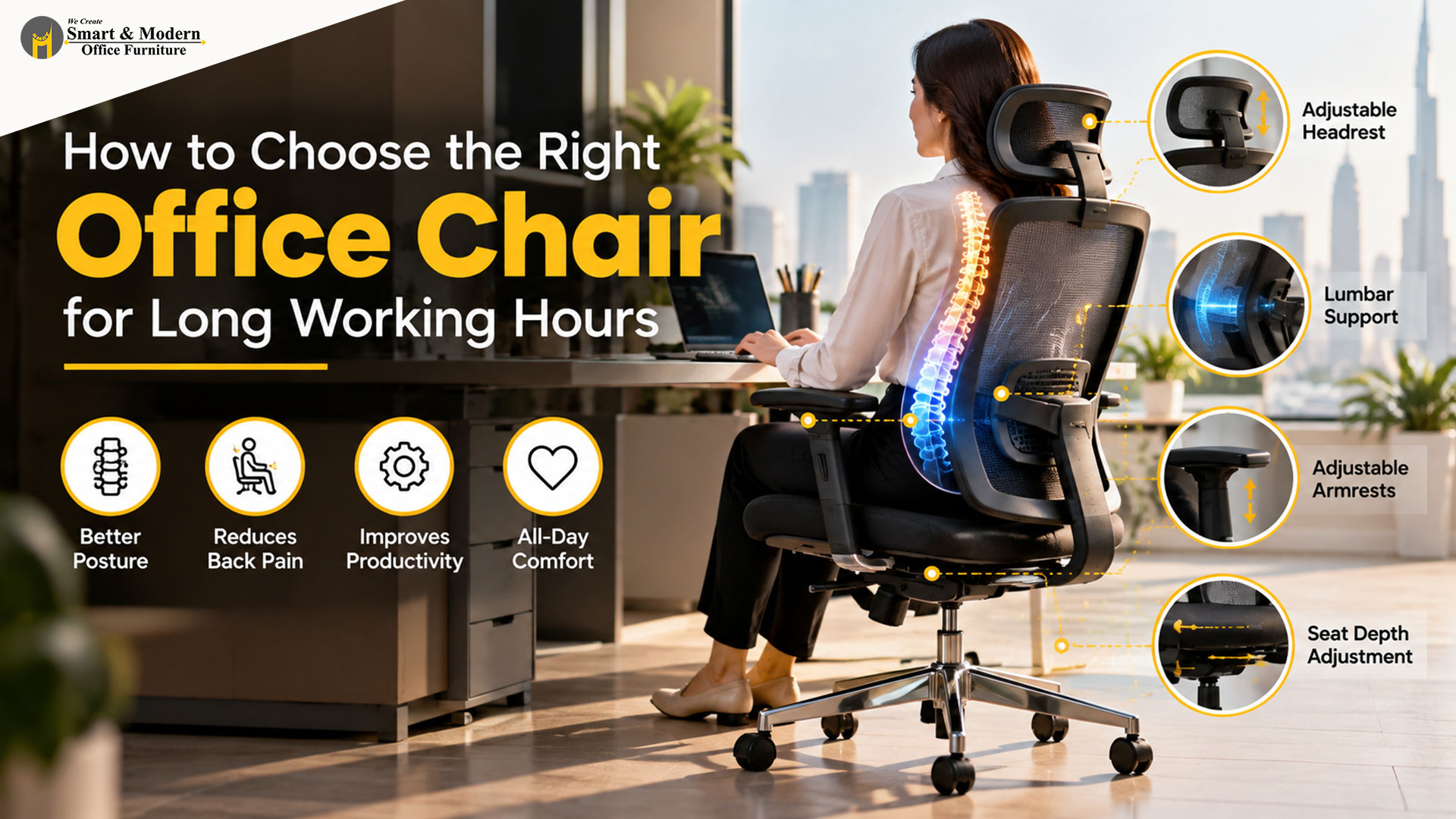
1. Look for Proper Lumbar Support
One of the first things to check is the backrest.
A good ergonomic office chair should provide support around the natural curve of your lower back. Adjustable lumbar support is particularly useful because people have different body shapes and sitting preferences.
The goal isn’t simply to have a thick backrest. The support should feel comfortable and help you maintain a more natural sitting position while working.
For employees who spend most of their day at a computer, a properly adjustable backrest can make the chair much easier to personalize.
2. Choose an Adjustable Office Chair
There is no single chair position that works perfectly for everyone.
That’s why adjustability is one of the most important features to consider when buying an office chair in Dubai. Look for a chair that allows you to adjust the seat height and, depending on the model, the backrest, seat depth, armrests and lumbar support.
Your feet should be comfortably supported, while your chair height should work with the height of your desk. OSHA also recommends adjusting the chair together with the monitor, keyboard and other workstation components rather than treating the chair as a separate item.
3. Pay Attention to Seat Comfort and Depth
A comfortable seat isn’t necessarily the softest seat.
For long working hours, the seat should provide adequate support without putting unnecessary pressure behind your knees. OSHA’s workstation guidance recommends a seat that supports the thighs while avoiding excessive pressure at the back of the knees.
Seat width and depth also matter. A chair that is too narrow or too deep may make it difficult to find a comfortable working position.
When possible, try the office chair before purchasing it. A chair that looks comfortable in a showroom or catalogue may feel very different after several hours of use.
4. Don’t Ignore the Armrests
Armrests can make a noticeable difference when you’re working at a computer for extended periods.
Adjustable armrests allow you to position your arms more comfortably while typing, using a mouse or attending meetings. They should support your forearms without preventing the chair from moving close enough to the desk.
For shared workplaces, adjustable armrests are particularly useful because employees may have different heights and working preferences.
5. Consider the Chair Material
The material of your office chair affects both appearance and everyday comfort.
Mesh office chairs are popular in modern workplaces because their breathable backrests can provide airflow. Fabric chairs can offer a softer, more traditional feel, while leather and leather-look finishes can create a more executive appearance.
The right material depends on your office environment, design preferences, maintenance requirements and budget.
For a contemporary corporate office, a combination of ergonomic design and a breathable mesh back can be a practical choice.
6. Make Sure the Chair Works With Your Desk
Even a well-designed ergonomic chair won’t work properly if the rest of your workstation is poorly arranged.
Your chair, desk, monitor, keyboard and mouse should work together. OSHA recommends arranging workstation components so that users can maintain more neutral body positions and avoid unnecessary reaching or awkward postures.
This is particularly important when selecting office furniture in Dubai, where businesses may be designing everything from individual workstations to complete corporate offices.
A height-adjustable desk can also provide additional flexibility by allowing users to change between sitting and standing during the working day.
7. Remember That Movement Still Matters
An ergonomic chair is not designed to keep you completely still all day.
Even with a well-designed chair and good sitting posture, changing position regularly is important. OSHA recommends making small adjustments, stretching and standing or walking periodically rather than remaining in the same position for prolonged periods.
This means the best workstation is not simply a comfortable chair. It is a workspace that allows you to change positions and work naturally throughout the day.
8. Choose a Chair That Fits Your Office
The right chair also needs to suit the type of workplace you are creating.
For an open-plan office, ergonomic mesh chairs can provide a clean and practical appearance. Executive offices may require larger high-back chairs with a more premium design. Meeting rooms, reception areas and visitor spaces may require completely different types of seating.
This is why choosing office furniture in Dubai should ideally be approached as a complete workspace-planning decision rather than buying individual furniture pieces without considering the overall layout.
What Is the Best Office Chair for Long Working Hours?
There isn’t one office chair that is perfect for every person.
The right choice depends on your body size, working habits, desk height, preferred sitting position and the features you find comfortable. A good starting point is to look for an adjustable office chair with suitable lumbar support, an appropriately sized seat, supportive armrests and a stable base.
Most importantly, don’t choose a chair based only on its appearance.
A modern office chair should look good, but it should also support the way you actually work.
Create a More Comfortable Workspace
The right office chair is only one part of a well-designed workplace. At Smart & Modern Office Furniture, we provide office furniture solutions designed around the requirements of modern businesses, including ergonomic office chairs, workstations, executive desks, meeting tables and storage solutions.
Whether you’re setting up a small office or planning a complete corporate workspace in Dubai, choosing furniture around your employees, available space and daily work requirements can create a more practical and comfortable environment.
