
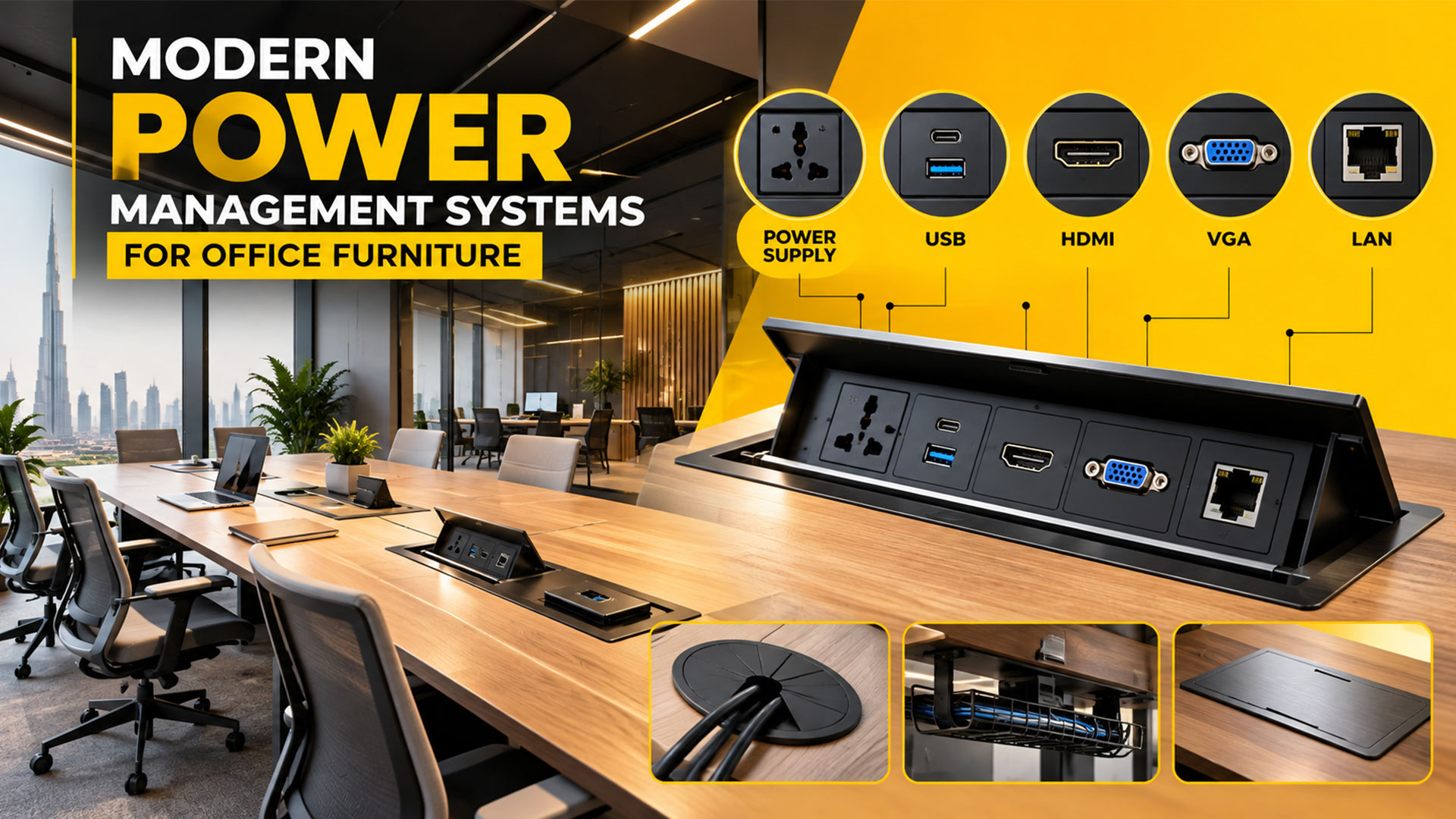
Office Furniture Power Management Solution Systems
-
By Smart Modern
- Posted on
- 0 comments
Modern offices rely on more than desks and chairs. Employees need convenient access to electricity, charging ports, internet connections, and audiovisual equipment to work efficiently. This is why integrated power management systems for office furniture have become an important feature in contemporary workstations, executive desks, meeting tables, and conference rooms.
From built-in power sockets and USB charging ports to HDMI, VGA, and LAN connections, modern office furniture can be designed to support the technology employees use every day. These solutions help organise cables, improve accessibility, and create a cleaner, more professional workspace.
For businesses in Dubai and across the UAE, selecting the right office furniture power solutions can help create practical, connected, and future-ready work environments.
What Are Office Furniture Power Management Systems?
Office furniture power management systems are integrated electrical and connectivity solutions that provide access to power, data, and media connections directly from desks, workstations, meeting tables, or other furniture.
Instead of placing extension cords across the floor or requiring employees to reach beneath their desks, these systems bring essential connections closer to the user.
Depending on the configuration, a power management unit may include electrical sockets, USB-A or USB-C charging, HDMI, VGA, LAN or Ethernet ports, and cable management features. Some units are installed flush with the tabletop, while others use flip-up covers, pop-up mechanisms, desktop housings, or modular power rails. <Cite refs={[“turn397604search14″,”turn397604search1″,”turn397604search2”]}/>
These systems are particularly useful in modern corporate offices, collaborative workspaces, executive cabins, training rooms, and boardrooms.
Types of Power and Connectivity Solutions for Office Furniture
1. Integrated Power Supply Sockets
Electrical power sockets are the foundation of most office power management systems. They provide convenient access to electricity for laptops, desktop computers, monitors, chargers, and other approved office equipment.
Power sockets can be integrated into:
- Executive desks and manager tables.
- Individual and multi-person workstations.
- Conference and meeting tables.
- Reception desks.
- Training and collaborative furniture.
Depending on the furniture design, sockets may be installed within the tabletop, on the surface, or beneath the desk in a dedicated power unit.
The correct configuration depends on the number of users, equipment requirements, furniture dimensions, and applicable electrical safety standards.
2. USB-A and USB-C Charging Ports
USB charging is an increasingly useful feature in technology-enabled workplaces. Built-in USB-A and USB-C ports can provide convenient charging access for compatible smartphones, tablets, and other devices.
USB-C charging capabilities vary by module. Businesses should check the supported power output and device compatibility before selecting a charging solution, particularly when they need to charge laptops rather than smaller mobile devices.
Integrated charging can help reduce the need for separate adapters and keep frequently used connections within easy reach.
3. HDMI Ports for Displays and Presentations
HDMI connections are widely used to transmit digital video and audio between compatible devices. In office furniture, HDMI ports are particularly valuable for conference tables, meeting rooms, boardrooms, and presentation spaces.
With a suitable HDMI connection, users can connect compatible laptops or other devices to meeting-room displays and projectors.
An integrated HDMI module can help keep presentation cables organised and make it easier for employees and visitors to connect their devices during meetings.
When specifying HDMI connections, consider cable length, supported resolution, refresh rate, and the requirements of the connected equipment.
4. VGA Connections for Legacy Equipment
VGA is an older video connection that may still be required in offices with legacy projectors, displays, or presentation equipment.
Although many modern devices use HDMI or other digital connections, some organisations continue to use VGA-compatible equipment. Including VGA in a furniture power module can be useful when a meeting room must support older technology.
Before specifying VGA, check whether the organisation’s existing equipment actually requires it. For new installations, HDMI and other suitable modern connections may be more appropriate.
5. LAN and Ethernet Ports
A LAN connection, commonly provided through an RJ45 Ethernet port, allows compatible devices to connect to a wired network.
In offices where stable network access is important, integrated Ethernet connections can be useful for desktop computers, docking stations, and meeting-room equipment.
LAN ports can be incorporated into executive desks, office workstations, conference tables, and collaborative furniture. The network cabling and switching infrastructure must also be properly planned to ensure the connection works as intended.
For businesses with specific network security or performance requirements, the IT team should confirm the appropriate network configuration before installation.
6. Integrated Cable Management Systems
Power and connectivity modules work best when combined with effective cable management. Cable trays, under-desk channels, grommets, cable baskets, and concealed routing paths help organise the wires connecting devices to power and data sources.
Good cable management can:
- Reduce visible cable clutter.
- Keep work surfaces more organised.
- Improve access to connections during maintenance.
- Help prevent cables from obstructing normal movement.
- Support a clean, professional office appearance.
Cable routes should be planned alongside the furniture layout, especially where desks are positioned in clusters or connected to shared power and data infrastructure.
Types of Power Modules Used in Modern Office Furniture
Different furniture designs require different mounting solutions.
In-desk power modules: Installed within a tabletop, often with a cover that conceals the connections when they are not in use.
Flip-top power units: Provide access to sockets and ports through a hinged lid, making them useful for meeting tables and conference furniture.
Pop-up power modules: Rise from the tabletop when required and retract when not in use, depending on the mechanism.
Surface-mounted power units: Attach to the desk surface or edge and can be suitable when cutting into the tabletop is not desirable.
Power rails: Provide a longer access point with configurable power or connectivity modules, depending on the system.
Under-desk power solutions: Position power distribution and cable connections beneath the work surface, helping keep the tabletop clear.
These options are available in different configurations, finishes, and installation formats. The best choice depends on the furniture design, available space, required connections, and installation conditions. <Cite refs={[“turn397604search14″,”turn397604search8″,”turn397604search2”]}/>
How to Choose the Right Power Management System for Your Office
Selecting the right office furniture connectivity solution begins with understanding how employees use their workspace.
Assess the number of users
A single executive desk may require only a few power and charging connections. A multi-person workstation or boardroom may need several sockets, data connections, and shared presentation ports.
Plan the number of connections according to the actual equipment and users rather than adding unnecessary ports.
Identify the required connections
Prepare a list of the devices that will be connected to the furniture. Consider electrical power, USB-A, USB-C, HDMI, VGA, and LAN requirements.
For meeting rooms, check the display and conferencing equipment. For workstations, consider computers, monitors, docking stations, and charging needs.
Match the module to the furniture
The dimensions, thickness, material, and construction of the tabletop affect which power module can be installed. Cut-out dimensions, mounting clearance, cable access, and serviceability should be checked before manufacturing or modifying furniture.
Consider appearance and accessibility
A well-designed power management system should complement the furniture finish and remain convenient to use. Black, white, and metallic finishes are available for various products, depending on the manufacturer and model.
Choose a layout that provides practical access without interfering with the user’s workspace.
Prioritise electrical safety
Electrical power modules should be appropriately rated for their intended use and installed according to the manufacturer’s instructions and applicable local requirements. Electrical installation should be handled by qualified professionals.
Keep power and data cabling properly routed, and ensure that maintenance access and ventilation requirements are considered where applicable.
Why Integrated Power Solutions Matter in Dubai’s Modern Offices
Businesses across Dubai and the UAE use a wide range of office technologies, from everyday computers and charging devices to large meeting-room displays and collaborative presentation systems.
Integrated power management helps furniture accommodate these needs while maintaining an organised appearance.
For corporate offices, it can support practical workstation arrangements. For boardrooms, it can simplify access to presentation and connectivity ports. For executive offices, it can combine convenient power access with a refined furniture design.
When planning a new office or upgrading an existing workspace, power management should be considered alongside workstation selection, furniture dimensions, cable routing, and the overall office layout.
Integrate Smart Connectivity into Your Office Furniture
Modern office furniture should support both the appearance and functionality of a workspace. By combining practical furniture design with appropriate power, charging, data, and media connections, businesses can create work environments that are organised and ready for everyday technology use.
Smart & Modern Office Furniture offers office furniture solutions for businesses in Dubai and across the UAE. Whether you are planning workstations, executive desks, meeting tables, or a complete office setup, consider connectivity requirements early in the design process to help ensure that your furniture meets your team’s needs.
Planning a modern office with integrated power and connectivity?
Contact Smart & Modern Office Furniture to discuss your furniture requirements and explore suitable solutions for your workspace.
Smart & Modern Office Furniture
Dubai, UAE
Phone: +971 50 585 3925
Website: https://smartofficefurniture.ae/
