
3D Layout for Office vs CAD Layout: What Is the Difference?
-
By Smart Modern
- Posted on
- 0 comments
Planning a new office is about more than choosing desks, chairs, and workstations. A well-designed office needs the right layout, efficient space utilisation, comfortable circulation, and furniture that supports everyday business activities. Before starting an office fit-out or ordering custom furniture, it is important to understand how the space will work.
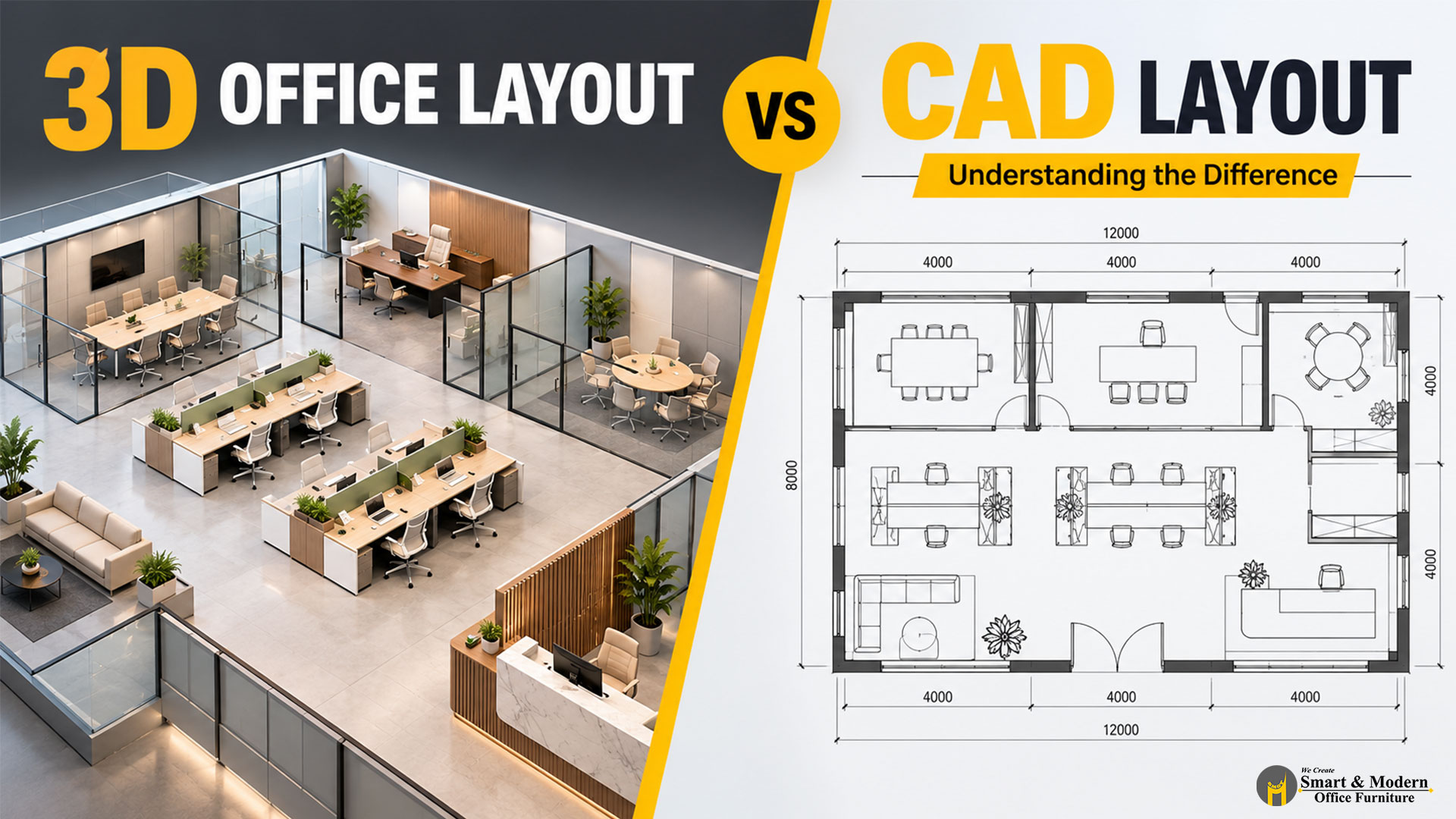
Two common tools used in office planning are 3D office layouts and CAD layouts. Both help designers plan workspaces, but they serve different purposes. A CAD layout is commonly used to communicate accurate dimensions and furniture positions, while a 3D office layout helps clients visualise how the proposed workspace may look in real life.
In this guide, we explain the difference between 3D office layout design and CAD drawings, their benefits, and how to choose the right approach for your office in Dubai or anywhere in the UAE.
What Is a CAD Office Layout?
A CAD office layout is a technical drawing created using Computer-Aided Design software. In office planning, a CAD floor plan commonly presents the workspace from a top-down view, showing walls, doors, windows, dimensions, workstations, meeting rooms, reception areas, and other furniture positions.
CAD layouts help designers, architects, contractors, and furniture suppliers understand the proposed arrangement of an office with greater precision.
Key features of a CAD office layout
- Accurate measurements and dimensions.
- Clear positioning of desks, chairs, workstations, and storage units.
- Planning for walkways, entrances, and circulation areas.
- Furniture spacing and room arrangement.
- Technical drawings that can support quotations, coordination, and installation planning.
For example, if a company in Dubai wants to install a 20-person workstation layout, a CAD drawing can help determine how the desks fit within the available floor area and where walkways and other office facilities should be positioned.
Best suited for: Technical planning, measurement-based furniture layouts, space coordination, and installation documentation.
What Is a 3D Office Layout?
A 3D office layout is a three-dimensional visual representation of a proposed workspace. Instead of showing only a flat floor plan, it illustrates the office with depth, furniture forms, colours, materials, finishes, and lighting.
A 3D layout can help business owners understand the appearance of their future office before furniture is manufactured or installed.
Key features of a 3D office layout
- Realistic or illustrative views of the proposed office.
- Visual representation of office desks, chairs, workstations, and storage.
- Preview of furniture colours, materials, and finishes.
- Better understanding of proportions and the overall interior.
- Opportunities to compare alternative furniture arrangements and design concepts.
For example, a company planning a new executive office can use a 3D design to preview an executive desk, leather chair, storage cabinet, wall finishes, and surrounding furniture together before finalising the design.
Best suited for: Design presentations, furniture selection, visualising office interiors, and reviewing design concepts with clients.
3D Office Layout vs CAD Layout: Key Differences
Although both methods support office planning, they communicate different types of information.
| Feature | CAD office layout | 3D office layout |
|---|---|---|
| Main purpose | Technical planning | Visualisation and design presentation |
| Appearance | Usually a flat, top-down drawing | Three-dimensional view |
| Measurements | Clearly documented dimensions | Depends on the underlying model and annotations |
| Furniture positioning | Shows footprints and positions | Shows furniture in visual context |
| Colours and materials | Usually limited or symbolic | Can represent proposed finishes and materials |
| Understanding the design | Requires some drawing interpretation | Generally easier for non-technical clients to understand |
| Common users | Designers, architects, contractors, suppliers | Business owners, clients, designers, and project teams |
| Typical use | Layout coordination and installation planning | Reviewing the look and feel of the proposed workspace |
Important: CAD is not limited to 2D drawings. CAD software can also create 3D models. In this comparison, “CAD layout” refers mainly to the conventional 2D technical floor plan, while “3D layout” refers to a visual representation of the proposed office.
Benefits of a CAD Layout for Office Furniture Planning
1. Accurate space utilisation
A CAD drawing helps designers work with the available floor dimensions and position furniture accordingly. This is particularly useful for offices where several workstations, storage units, meeting tables, and circulation routes must fit within a defined space.
2. Clear furniture positioning
The drawing can show the location and footprint of each desk, chair, cabinet, and workstation. This makes it easier to review the arrangement before confirming furniture specifications.
3. Better coordination
CAD drawings can help office furniture suppliers coordinate their proposed layouts with architects, interior designers, fit-out teams, and other project stakeholders.
4. Practical installation planning
A dimensioned layout can support the positioning and installation of furniture. Additional drawings may be required for detailed joinery, electrical services, cable management, or other project-specific requirements.
Benefits of a 3D Office Layout
1. Visualise your office before installation
One of the biggest advantages of 3D office design is that clients can see a representation of the proposed workspace before committing to the final arrangement.
Instead of interpreting lines and symbols, they can review how desks, chairs, partitions, storage, and other furniture elements work together visually.
2. Compare furniture colours and finishes
Office furniture contributes to the overall appearance of a workplace. A 3D layout can help compare wood finishes, upholstery colours, workstation partitions, and other design elements.
This is especially useful when creating a consistent look across executive cabins, open-plan workstations, meeting rooms, and reception areas.
3. Make design decisions with greater confidence
A visual representation can help clients identify preferences and request changes before manufacturing or installation begins. It can also improve communication between the client and design team.
4. Create a cohesive office interior
A 3D office layout allows the proposed furniture to be reviewed as part of the wider interior design. This helps teams consider the relationship between furniture styles, colours, proportions, and the overall workplace environment.
Keep in mind that a 3D render is a visualisation, not a guarantee of the exact final appearance. Actual finishes, lighting, dimensions, and materials should be confirmed before production.
Which Is Better for Your Office in Dubai?
The right option depends on your project requirements, the available drawings, and the decisions you need to make.
Choose a CAD layout if:
- You need a dimensioned office floor plan.
- You want to check furniture footprints and spacing.
- You need to coordinate furniture positions with a fit-out team.
- Your project requires technical drawings for planning and installation.
Choose a 3D office layout if:
- You want to visualise the proposed office before purchasing furniture.
- You need to compare different workstation designs or furniture finishes.
- You want to present a design concept to management or business partners.
- You find it difficult to interpret conventional technical drawings.
Should you use both?
For many office furniture projects, the most effective approach is to use both methods.
Start with the available architectural floor plan and create a dimensioned furniture layout. Once the proposed arrangement has been reviewed, a 3D visualisation can help communicate the design, furniture styles, and finishes.
The technical layout supports practical planning, while the 3D view helps everyone understand the intended result. The final workflow depends on the project’s scope and documentation requirements.
How 3D and CAD Layouts Help Reduce Office Planning Mistakes
Office furniture should fit the available space without making the workplace uncomfortable or difficult to navigate. Reviewing the layout before ordering furniture can help identify potential issues early.
A well-planned office layout should consider:
- Workstation capacity: Is there sufficient space for the required number of employees?
- Circulation: Can employees move comfortably between desks, meeting rooms, and shared areas?
- Furniture dimensions: Do desks, chairs, cabinets, and meeting tables fit the intended positions?
- Storage requirements: Is there enough space for documents, office supplies, and personal belongings?
- Cable management: Have power and data requirements been considered?
- Brand identity: Do the proposed furniture finishes and colours align with the company’s interior design?
CAD drawings can help check dimensions and positions, while 3D visualisations can help communicate the proposed arrangement and appearance. Neither method replaces site verification or the technical checks required for a particular project.
Plan Your Office Furniture with Smart & Modern Office Furniture
Choosing the right office furniture starts with understanding your space, your team’s needs, and your preferred design.
Smart & Modern Office Furniture provides office furniture solutions for modern workplaces in Dubai and across the UAE. Whether you are planning an executive cabin, an open-plan workstation area, a meeting room, or a complete office setup, thoughtful furniture planning can help create a workspace that is functional, professional, and visually consistent.
From office desks and ergonomic chairs to workstations, reception furniture, and storage solutions, selecting the right products and layout can help you make better use of your available space.
Planning a new office or upgrading your existing workspace?
Contact Smart & Modern Office Furniture to discuss your office furniture requirements and explore suitable solutions for your project.
Smart & Modern Office Furniture
Dubai, UAE
Phone: +971 50 585 3925
Website: https://smartofficefurniture.ae/
